DALI Broadcast, DSI, and 1-10V Controllers
Overview
The process for configuring DALI broadcast controller outputs is the same as for DSI and 1-10V outputs. Drivers connected to a controller’s output are considered a single circuit. This means when configured for DALI broadcast, DSI or 1-10V control, drivers are controlled together as one channel. No enumeration is possible.
Initialization
Prior to configuring the controller, the installer should initialize the drivers by pressing the service switch three times within four seconds. This is confirmed by all drivers being driven to full output and enables the installer to visually check that all drivers are connected to the DALI network.
The relevant Service Switch functions are:
-
1 push = Network sign-on.
-
3 pushes = All Channels 100%. You should do this to normalize the connected driver settings. (DALI channels will setup the connected drivers with Min/Max/PowerOn/SystemFail levels, and 2 second Fade Time).
-
Push and hold for 4 seconds and release = Device reset.
DALI Broadcast, DSI and 1-10 V configuration
Controller functions are accessible from the System view toolbar when the load controller is selected or by right-clicking the load controller to access the context menu.
Click on the toolbar and hover the mouse pointer over each button to reveal tooltips describing the function of each button.


Complete the following configuration tasks:
-
Add a controller to the job
-
Enter device properties
-
Configure circuit properties
-
Locate circuits
-
Assign circuits to areas and channels
-
Configure lighting scenes
Adding a controller to the job
-
Open a new job in SB and connect to the network.
-
Add the device to your project using one of the following two methods:
-
 Insert Device from List (Ctrl+D) – to precommission the device.
 -
 Insert Device from Network (Ctrl+L) – to search for an online device or sign-on the device.
-
Entering device properties
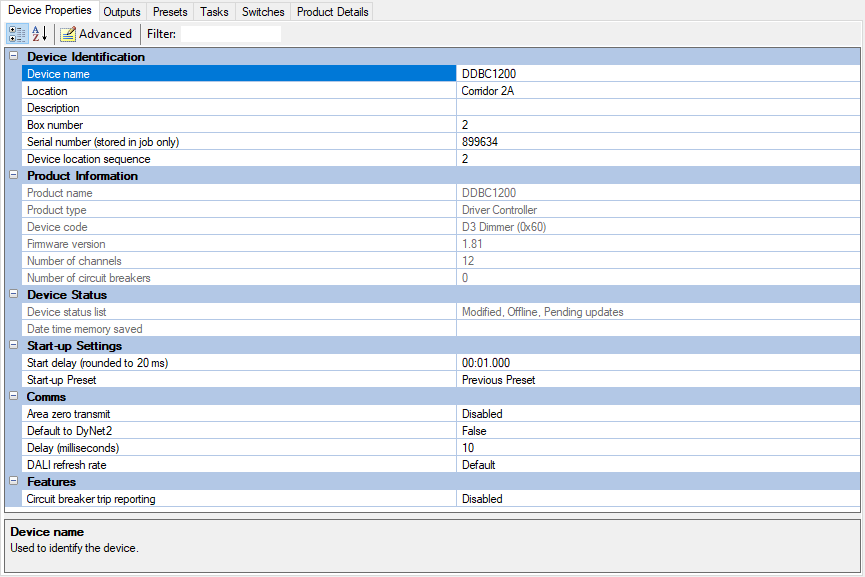
The System view Device Properties editor contains properties that affect the global operation of the controller. Click  Advanced to display all properties. DALI-specific properties are described under DALI settings. For more information, refer to Property Editors.