Adding Your Interact Account to SB
A System Builder technician license or Interact Multisite license is required to add an Interact account.
If you have already set up an Interact account, opening SB prompts you to log in. If not, you can add one or more Interact accounts to SB. Single Sign-On (SSO) is enabled for Signify users.
-
In SB, select Tools >
 Interact Accounts.
 -
Click
 Add and select
  Dynalite Cloud Account…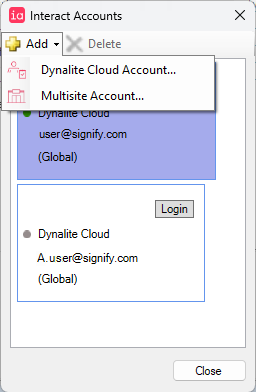
-
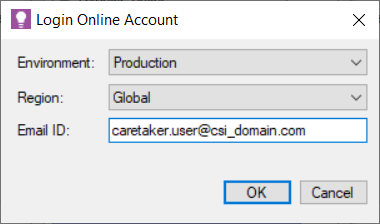
Select the Environment, Region and enter your Email ID.
-
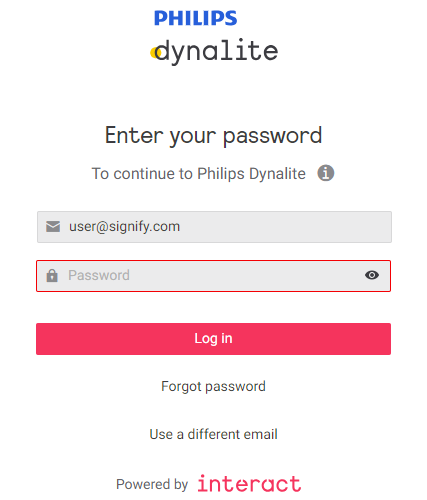
System Builder prompts you to log in to your Interact account.
-
Enter your password and click the Log in button. You can also click Forgot Password, or Use a different email to log in.
-
The online account is added to System Builder and the purple shading indicates that the account is logged in.
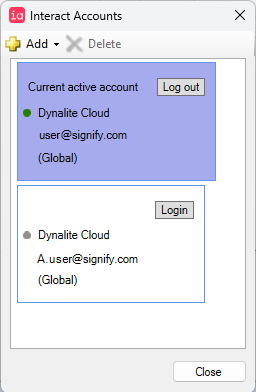
| System Builder can only be logged into one online account at a time. |
The status bar at the bottom of the SB window shows:
-
Number of devices in the job.
-
Online login status and the Interact account username.
-
Network connection status.
-
TCP
-
UDP
-
COM
-
Cloud (remote connectivity).
-
